AI Agents vs. Chatbots: What’s Actually the Difference?
| TL;DR — 30-Second Summary The one-line answer: chatbots respond to questions. AI agents take action to get things done. – Chatbots are reactive. They wait for a prompt and serve a scripted or LLM-generated reply within a fixed scope. – AI agents are autonomous. They reason, plan, connect to tools, and execute multi-step tasks end-to-end — without hand-holding. The market has voted: The global AI agents market was valued at USD 7.63 billion in 2025 and is expected to reach USD 182.97 billion by 2033, expanding at a compound annual growth rate (CAGR) of 49.6% from 2026 to 2033 [Grand View Research]. |
“AI agent” is suddenly everywhere. On vendor slides, in LinkedIn posts, in your CEO’s strategy memo. And if you’re quietly wondering whether it’s just a fancier label for the chatbot you already have. Then, you are asking exactly the right question.
These two terms describe fundamentally different technologies. The confusion is understandable because they share the same conversational surface: you type, something responds. But underneath that surface, the architecture, the capabilities, and most critically — the business outcomes are worlds apart.
Picking the wrong one is not a minor inconvenience.
Teams that deploy chatbots for workflows that need agents end up with frustrated customers, constant human escalations, and automation that creates more operational overhead than it saves.
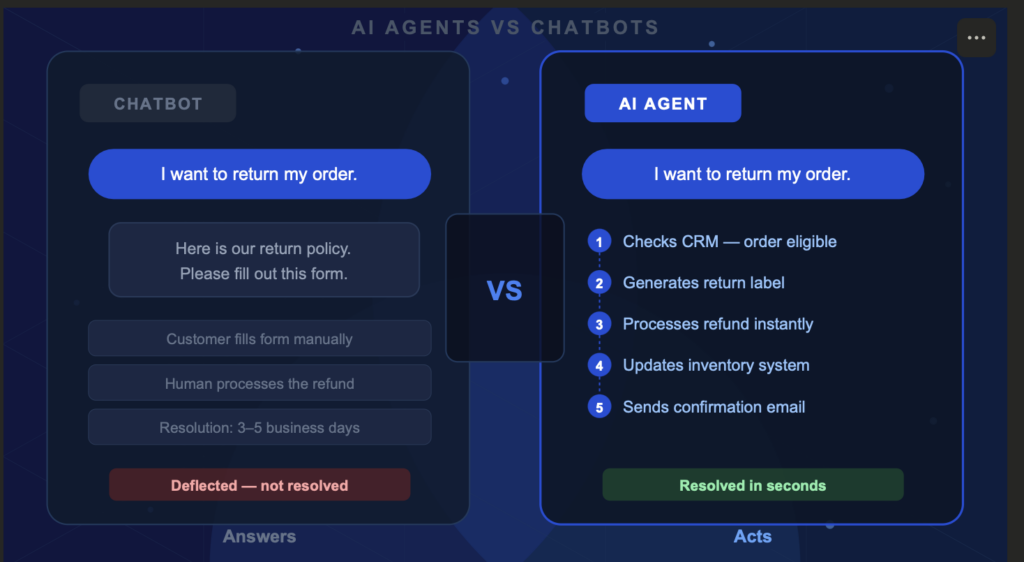
Chatbots react to single questions with scripted replies like a receptionist checking a menu while AI agents act independently, making decisions, taking multiple steps, and adapting to changes like a virtual assistant booking your full trip.
With this guide, you can understand the key difference between these terms and technologies and make an informed decision while choosing the right one for your business or job. Before we learn about the differences, let’s go back to history and understand how we evolved from chatbots to AI agents.
From Scripts to Autonomous Systems: A Brief Journey to AI Agents
To understand the gap between chatbots and AI agents today, it helps to trace how conversational AI evolved. Each generation unlocked something the last one could not do and the jump from generation three to four is the biggest leap yet.
Generation 1: rule-based bots (1966 to early 2010s)
The first chatbots ran on hard-coded decision trees. If a user typed “return,” the bot matched the keyword and served a scripted response. ELIZA, built at MIT in 1966, was the prototype. These systems were predictable and cheap to build, but completely brittle. One off-script message and the whole thing collapsed.
Generation 2: NLU-powered chatbots (2010s)
Natural language understanding (NLU) was a genuine step forward. Instead of matching exact keywords, these bots could recognize intent. The phrase “I need to send something back” and “how do I return my order?” could both map to the same workflow. Context could be maintained across a few turns in a conversation. This is the chatbot that most businesses still run today.
Generation 3: LLM-powered chatbots (2020 to 2024)
Large language models (LLMs) gave chatbots fluent, natural-sounding responses and the ability to handle almost any phrasing gracefully. But here is the critical point most vendors gloss over: LLM-powered chatbots are still read-only. They produce text. They do not take action. Asking one to process a refund is like asking a library to cancel your subscription.
Generation 4: agentic AI (2025 onwards)
This is the step change. Agentic AI is read-write. It does not just generate a response — it executes actions across connected systems. It plans, reasons, uses tools, and carries tasks through to completion. Gartner reports that enterprise applications embedding task-specific AI agents grew from under 5% in 2025 to a projected 40% by end of 2026 — one of the steepest adoption curves in enterprise software history.
Key takeaway: Generations 1 through 3 were all read-only. They consumed input and handed output back to a human to act on. Agentic AI is the first generation that carries the task through to completion. That is not a product upgrade. That is a category shift.
What Is an AI Chatbot?
A chatbot is a software program designed to simulate conversation — typically via text or voice. Modern chatbots are powered by NLU or LLMs, which makes them impressively fluent.
But their core architecture is reactive: a chatbot waits for input and generates a response within a predefined or model-defined scope.
The job of a chatbot is to map input to output. Whether that output comes from a decision tree, a knowledge base, or an LLM, the loop is always the same: user says something → chatbot responds. Nothing happens in any system outside that conversation window.
Where chatbots genuinely shine
Chatbots are not obsolete. They are the right tool when the question space is bounded, the answer is retrievable, and errors have low stakes:
- High-volume FAQs: store hours, shipping policies, pricing tables, order status lookups
- Lead capture: collecting contact details and routing prospects to the right queue
- Triage and routing: categorizing support tickets before they reach a human or agent
- Guided verification: walking users through identity confirmation at the start of a workflow
- Simple appointment booking: single-step scheduling with a fixed set of available slots
The numbers back this up.
82% of customers say they would use a chatbot rather than wait on hold for a simple question (Gartner). Chatbots reduce cost per interaction from $6 to $0.50 for routine queries — a 12x improvement — and the global chatbot market reached $11 billion in 2026 with nearly 1 billion users worldwide (Azumo).
Where chatbots structurally fail
The limitations are architectural, not cosmetic. No amount of better scripting or finer LLM tuning can fix them:
- They cannot take action: A chatbot can tell a customer the return policy. It cannot process the return, generate a label, update inventory, or trigger the refund.
- They break on complexity: Workflows that span multiple systems or require judgment calls cannot be completed by a system designed for input-output loops.
- They require constant maintenance: Every product change, policy update, or new scenario requires a developer to update the script. That debt compounds quickly.
- They frustrate customers at exactly the wrong moment: Simple queries are easy. The high-stakes moments like a billing dispute, a failed order, an urgent account change are precisely when chatbots escalate instead of resolve.
The frustration signal: 60% of consumers worry chatbots cannot understand their queries. 53% report frustration when their issue requires real resolution (DemandSage). When customers express frustration with your chatbot, that is not a UX problem. It is a signal that the wrong tool was deployed for the job.
What Is an AI Agent?
An AI agent is an autonomous system that can reason, plan, and act to accomplish a goal. You give it an objective that agent breaks into sub-tasks, selects the tools it needs, executes each step, evaluates the result, and adapts if something does not work.
The human sets the destination. The agent figures out the route and drives.
This is made possible by combining an LLM (for reasoning and language) with an execution loop and tool access. The agent continuously asks itself: where am I relative to the goal, what do I do next, and did that work? If an approach fails, it tries another. No script defines the path.
The five capabilities that separate agents from chatbots
1. Autonomous multi-step planning
Agents break a complex goal into an ordered sequence of sub-tasks and execute them without requiring a human to specify each step.
A chatbot needs the user to navigate: “what are my options” → “choose this one” → “confirm.” An agent handles the full chain from a single instruction.
2. Read-write tool access
Agents do not just read data — they write it back. They connect to CRMs, payment processors, databases, ticketing systems, and communication platforms to take action, not just report information. The Model Context Protocol (MCP), standardized in 2025, means a single agent can operate fluently across dozens of external systems.
3. Persistent memory
Unlike chatbots that reset between sessions, agents maintain memory across conversations. If a customer raised a billing dispute last month, the agent knows the history today and picks up in context — without the customer re-explaining everything from scratch.
4. Adaptive reasoning and self-correction
When one approach fails, agents re-plan and try another. A chatbot that encounters an unexpected input escalates to a human. An agent stays in the task — clarifying, adjusting, and continuing until the goal is reached or a genuine exception requires human judgment.
5. Proactive, goal-driven behavior
Agents can initiate actions without being prompted. A subscription renewal agent does not wait for a customer to call — it identifies upcoming renewals, sends the right communication at the right time, handles payment failures, and logs outcomes. All autonomously, all overnight if needed.
66% of senior executives report their agentic AI initiatives are already delivering measurable productivity or business value. 93% of IT leaders have either implemented AI agents or plan to within two years (DemandSage, 2026).
We’ve covered AI agent capabilities and chatbot foundations—now let’s see them solve real problems. These examples show exactly how they integrate into daily workflows, delivering measurable wins for teams.
AI Agent vs. Chatbot: 2 Real-World Examples That Show the Difference Between Them
Definitions only go so far. The fastest way to understand the AI agent vs chatbot gap is to watch both tools handle the exact same request and see what actually happens.
Every example below follows the same structure: same customer, same message, two completely different outcomes. These following two scenarios we will walk through:
Scenario 1: A customer wants to return an order
Customer says: “I want to return my order and get a refund.”
What the chatbot does:
Searches its knowledge base and replies:
“Our return policy allows returns within 30 days. Please fill out the return form here: [link]. A team member will process your request within 3 to 5 business days.”
The customer still fills out the form. A human still processes the refund. The inventory still needs a manual update. The chatbot answered the question — it did not solve the problem.
Resolution time: 3–5 business days.
Customer effort: High.
What the AI agent does:
The AI agent receives the same message and immediately executes the full workflow — without any additional prompts:
- Pulls the order from the CRM and confirms it falls within the 30-day return window
- Checks inventory rules and approves the return automatically
- Generates a prepaid return shipping label and emails it to the customer
- Processes the refund directly in the payment system (Stripe, PayPal, or native billing)
- Updates stock levels in the inventory management system
- Logs the action in the CRM and closes the ticket
The customer receives a confirmation email with the shipping label in seconds.
Resolution time: Under 60 seconds. Customer effort: Zero.
Scenario 2: A software customer reports a technical error
Customer says: “My V2 export feature keeps timing out with an error. I’m on the Enterprise plan and this is blocking my whole team.”
What the chatbot does:
Searches its FAQ library and returns:
“Export timeouts can sometimes happen due to file size or network issues. Here are some tips: [link to help article]. If the issue persists, contact our support team.”
The customer already tried the help article. Nothing is resolved. They are now frustrated and have to open a separate ticket. The chatbot deflected — again.
Resolution time: Unknown. Depends on support queue. Customer effort: High and climbing.
What the AI agent does:
The AI agent receives the ticket and begins a multi-step investigation — without waiting to be told what to do next:
- Runs a search of the knowledge base — finds articles about export timeouts but nothing matching this specific error pattern
- Calls the Salesforce API to retrieve the customer’s account details and confirms Enterprise plan status
- Queries the internal database to pull the last 10 export attempts from this account and identifies a spike in timeout errors starting 48 hours ago
- Cross-references with system logs and detects a backend infrastructure issue affecting a subset of Enterprise accounts
- Flags the issue for the engineering team with a pre-written incident summary
- Replies to the customer: “I’ve identified an infrastructure issue affecting your export feature. Your account has been flagged as high priority. Our engineering team has been notified and you’ll receive a status update within 2 hours. In the meantime, here’s a temporary workaround: [specific steps].”
The customer has a workaround in under 2 minutes and a human only gets involved to fix the root cause — not to triage the ticket.
Resolution time: Immediate triage, 2-hour full resolution. Customer effort: Zero.
Once you get the clear difference between an AI agent and a chatbot, lets take a quick look at the comparison table below.
AI Agents vs. Chatbots: A Complete Comparison
Now that the real-world AI agent vs chatbot difference is clear, here is a structured look at how the two technologies diverge across eight dimensions that actually affect deployment decisions, maintenance costs, and business outcomes.
| Dimension | Chatbot | AI Agent |
| Core function | Answer questions; surface information | Plan, reason, and complete tasks end-to-end autonomously |
| Operating mode | Reactive — waits for prompts; follows predefined logic | Proactive — initiates actions; adapts toward a goal |
| Memory and context | Session-based; resets between conversations | Persistent multi-session memory; learns from every interaction |
| System integration | Read-only API connections; basic information retrieval | Deep read-write integrations with CRMs, ERPs, payment systems, databases |
| Complexity handling | Breaks on off-script inputs; escalates to humans | Re-plans, self-corrects, handles multi-step workflows |
| Maintenance model | Constant script updates required with every change | Learns from documentation and feedback; improves through coaching |
| Typical ROI profile | 20–30% deflection rate on simple ticket volume (Rasa) | 40–60% ROI gains; 30–40% lower handling cost |
| Best-fit use case | FAQs, lead capture, triage, verification | End-to-end resolution, multi-system automation |
Chatbots generate value through deflection and they keep simple tickets from reaching humans. AI agents generate value through resolution and they close the loop entirely. Those are different metrics, and they compound very differently over time.
So before you decide which one belongs in your stack, ask yourself one question.
Should You Use an AI Agent or a Chatbot? Here’s How To Decide
The clearest question to ask yourself: do you need an answer, or do you need an outcome?
An answer is information surfaced to the user. An outcome is a task completed. That one distinction resolves the AI agent vs chatbot decision in almost every case.
Choose a chatbot if:
- Users ask predictable, bounded questions with retrievable answers — FAQs, order status, store hours, policy lookups
- No action in an external system is required — information only, no execution
- You are early in your AI adoption journey and workflows are genuinely simple
- Your success metric is deflection rate — keeping routine tickets away from humans
Choose an AI agent if:
- Users need their issue actually resolved, not just answered
- Your workflows touch multiple systems — CRM, billing, inventory, communications
- Your team spends hours maintaining and updating bot scripts after every product change
- Escalation rate to humans is consistently above 40%
- Your success metric is resolution rate, not deflection rate
Not sure yet? Use both.
A hybrid conversational AI architecture is what most mature teams run: chatbots handle the 60–70% of volume that is simple and predictable, AI agents handle the 25–30% that requires system access and judgment, and humans focus only on the edge cases that genuinely need them. The handoff between layers is invisible to the customer — they only feel the outcome.
The mistake is not choosing chatbots. The mistake is keeping chatbots in workflows that have outgrown them. High escalation rates, constant script maintenance, and customer frustration that persists despite ongoing optimization are not signs of a poorly built chatbot; they are signs the workflow belongs in AI agent territory.
Stay Ahead of the AI Curve
Get the latest AI trends, SaaS insights and tech news delivered to your inbox every week.
- ✦ Daily AI & SaaS news digest
- ✦ Exclusive founder insights
- ✦ Unsubscribe anytime
Tech Insights Daily
Free forever. No spam. Unsubscribe anytime.